Declare
is a UI language for you and your AI.
Just as SQL is a domain-specific language for database queries, Declare is a DSL for user interfaces. Its whole surface fits in your head — and inside an LLM’s context window.
This page is written in it. By an LLM.
Why a new language, now? →
The whole language, in one file →
01
Three applications, written in Declare.
Complete programs — open one, read it end to end, and edit it live in the browser you're using.
1
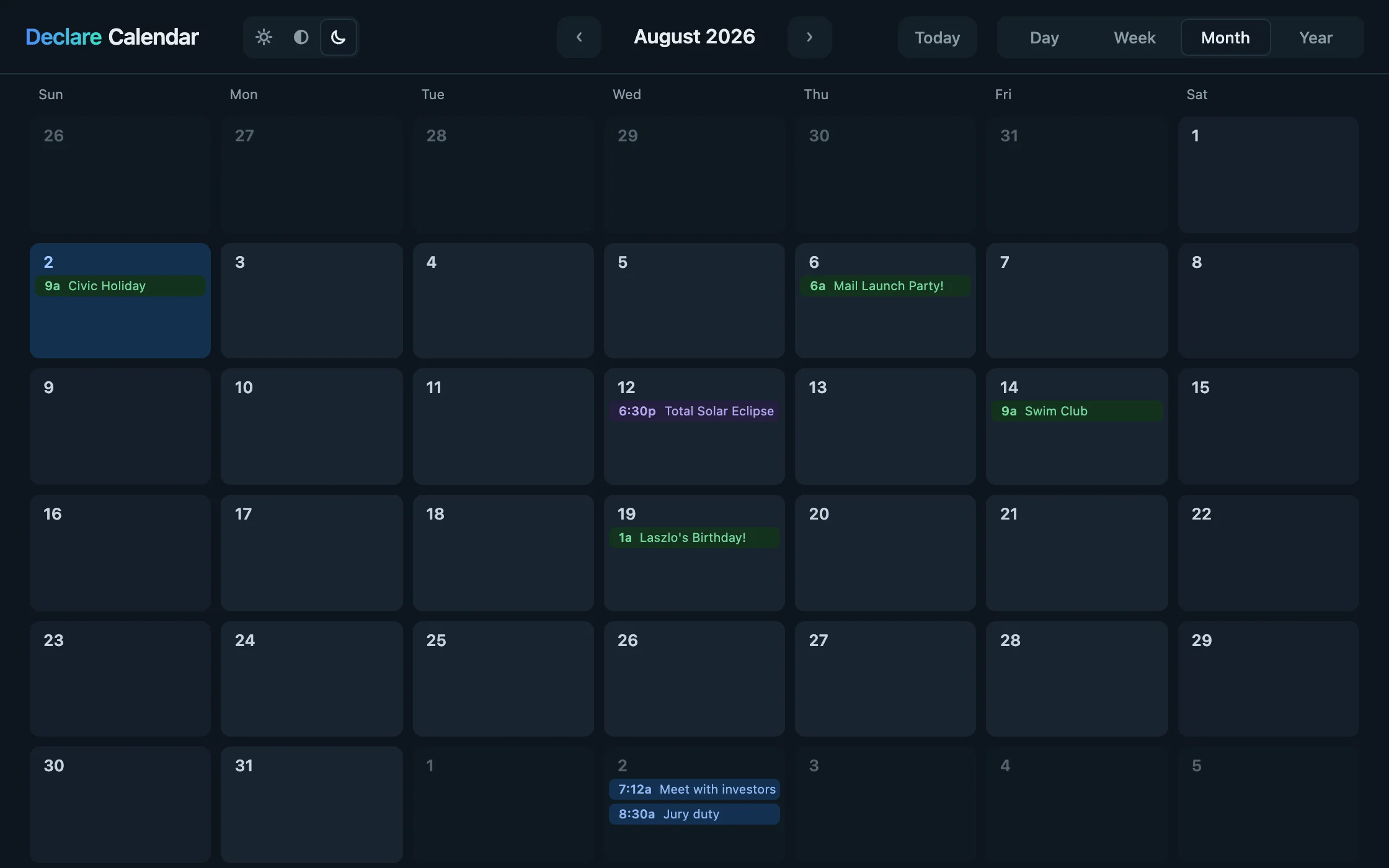
Declare Calendar
It’s the kind of experience you’ll see in the best native apps — a view doesn’t switch so much as become the next one, where motion carries meaning, and everything is fast and interruptible.
It runs on real data: open an event, drag it to another day, and it’s moved.
540
lines of code, plus 214 of comments — four views, zoom, drag and edit
156 KB
over the wire, gzipped — app (structure, logic, styling) and runtime
0
lines written by hand — an LLM wrote it
Run Declare Calendar →
View & edit source →
2
Declare Tracker
→
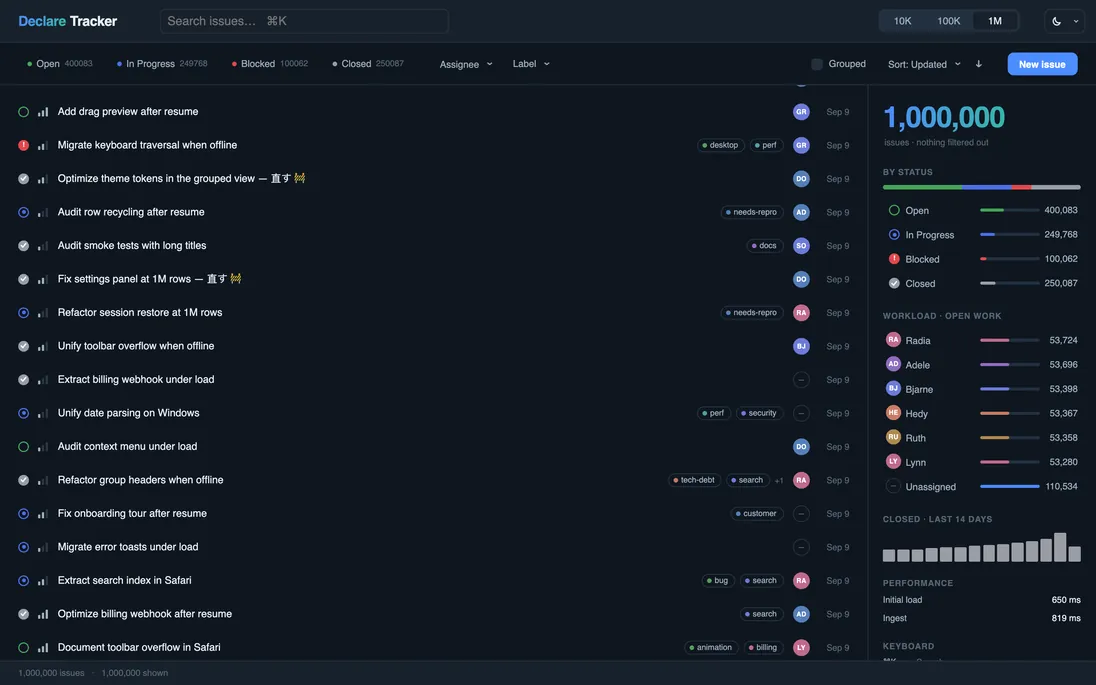
1,000,000 issues · search as you type · edit in place, with undo · not one line of virtualization code
1507 lines — 982 code, 251 comment · 173 KB over the wire, before its data · no dependencies
View & edit source →
3
Declare Desktop
→
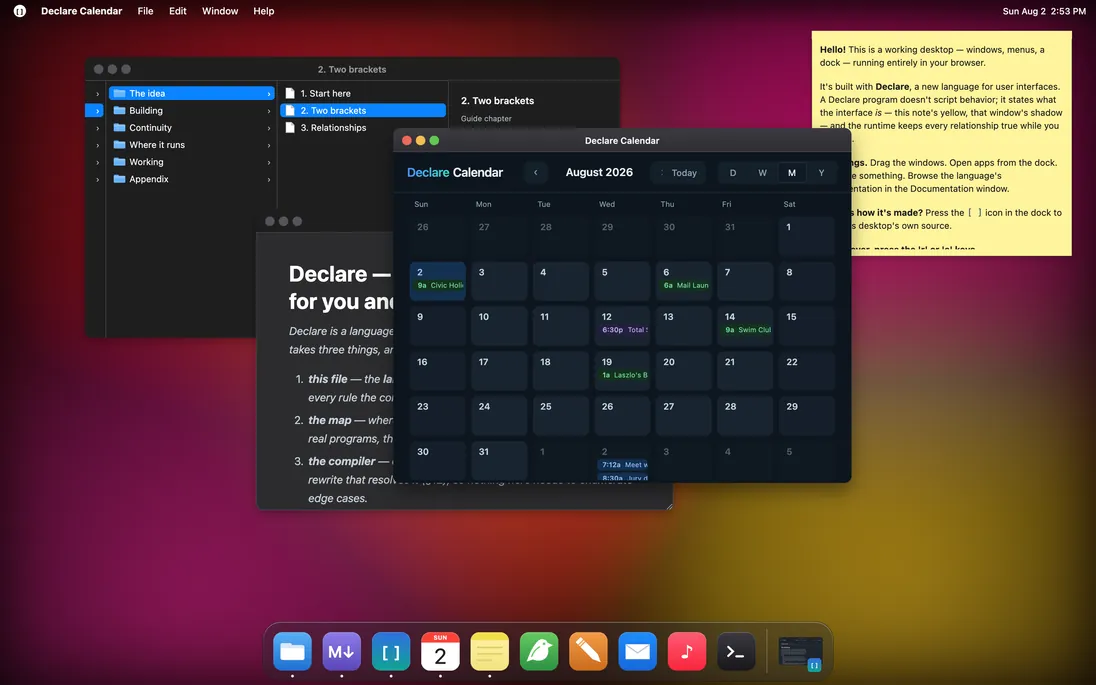
Windows that drag, resize, layer, and minimize into live dock thumbnails · a magnifying dock · menus that follow focus · the calendar running inside one of them
3493 lines — 1991 code, 930 comment · 239 KB over the wire · every pixel drawn from shapes, no image assets
View & edit source →
02
Declare it. It runs. It stays true.
A constraint isn’t a callback you remember to re-run — it’s a standing relationship the runtime keeps true, re-derived the moment its inputs change.
Three constraints track one value: the big number, the bar’s width, and its color. Click to bump v — all three update together, and the color crosses cool to warm at the halfway mark.
LIVE · EDITABLE
Revert
click anywhere to change v
40
03
Declare the shape, not the loop.
A view can be built from data instead of laid out by hand — the shape written once, the data deciding how many there are and what each one says.
One Gauge, instanced once per row of the data. Edit a number or add a row and the list rebuilds itself — no loop, no keys. And Gauge is auto-included: no import, no definition, just use it.
LIVE · EDITABLE
Revert
reactive
compiled
small
04
Motion you declare, not schedule.
You say where a thing belongs; a Spring finds the path there and settles by physics — motion you declare, not a timeline you sequence.
Click to toggle the ball’s target between two positions. The Spring follows and settles by physics — no timeline, no frames driven by hand.
LIVE · EDITABLE
Revert
click anywhere to toggle
Your AI can write the code. Can it tell when it’s wrong?
In Declare, yes. A small language gets it started; these four tools let it catch its mistakes, fix them, and finish.
Start with context
One installable skill: the language, the library, the conventions, the working loop — nothing to reconstruct from a repository. And declare-help answers any name or error code on demand.
Correct, don’t guess
Every diagnostic names the broken rule and the valid rewrite. Try it: change textColor to color in the first panel above and read what comes back.
Question the result
The Inspector can tell you or an agent why a live value is what it is, what it depends on, and what happens if you change it — live, in the running program, not guessed from source.
Prove the change
A formal six-rung ladder, from parse to pixels, is how an app is shown to be correct. Your AI climbs it one rung at a time, and every rung reports what it proved — and what it cannot see.
The calendar above was built this way: a person directed, an AI wrote every line, and the compiler kept it honest.
Small enough to know. Strict enough to trust.
Try it now →
Built in Declare
·
View Source
·
Docs
·
GitHub
·
MIT License
·
© 2026 David Temkin
Declare
Try it now
Why Declare
FAQ
Architecture
Apps
Docs
GitHub
WHY DECLARE
Why a new language, now?
Start with the obvious objection. LLMs write code now, and they’re best at the languages they’ve seen the most — so the winning move is to use whatever has the biggest corpus and let the model figure it out. By that logic the era of new programming languages is over.
That argument gets its facts right and its conclusion backwards. Producing code is now nearly free; trusting it costs what it always did. An LLM writing React verifies its work by resemblance — this looks like the billion lines it trained on — and resemblance is not correctness. Meanwhile, less and less of the code passes under human eyes, which leaves the language and its compiler as the one reviewer that is always present. Handing the writing to a machine doesn’t make the language irrelevant. It makes it load-bearing.
Two kinds of leverage
What an LLM gets from a mainstream stack is corpus leverage: fluency by imitation — broad, shallow, self-contradictory, unverifiable. The other kind is comprehension leverage: a language small enough to hand to a model whole, regular enough that its programs can be analyzed rather than pattern-matched, and backed by a compiler that turns each mistake into a precise correction. Corpus leverage arrives free with popularity. Comprehension leverage has to be designed in — and it is the only kind a new language can compete on.
This is a measured bet, not a hunch. LLMs can learn a language they never trained on from a spec in context — in recent studies, a small language purpose-designed for LLM use, with zero training exposure, beat the same model writing Python, its best-trained language. And what bounds a model’s ability to repair its own mistakes is the quality of the feedback: a compiler that explains beats one that merely rejects, by a double-digit margin.
The studies: a zero-corpus DSL vs. Python → · feedback quality vs. repair →
We measure it too. Given the same brief — a box office with a drawn seat map, seats selling live while you choose, sign-in and checkout — the same agent, Claude Code (Opus 5.5), built it once in React and once in Declare, from a download it had never seen. Both passed all eleven of the same hidden acceptance checks. The React app was 4,861 lines; the Declare app, 1,437.
Designed in, not bolted on
Declare’s declarative layer is small — the whole language fits in a model’s context window with room left for your app — and everything inside a { } is ordinary TypeScript, so the hard part of generation rides the largest corpus there is. Where Declare looks familiar, it behaves the way a model — or you — will assume: assignment is assignment, and there is no bypass to forget. Where it’s genuinely new, it looks new — brackets for structure, :path for data — a visible cue to consult the spec instead of autocompleting from memory.
And because a UI’s real structure — views, state, data, what reacts to what — is expressed in the language, the compiler can see all of it: it extracts every binding’s dependencies statically, checks the shape of the tree, and types the seams. What a model reasons about is exactly what the compiler verifies, and its errors are written for that loop — each one states the rule and names the rewrite that fixes it, because the primary reader of a compiler message, now, is an LLM deciding what to do next.
Indexable content is there from the start: the compiler runs your program at build time and serializes what it renders, so what a visitor sees and what a crawler sees can never drift. No server-side rendering, no hydration. That’s why this page works on a static host like GitHub Pages.
What it’s actually for
All of that is the floor, not the point. The point is what a language makes sayable. The most prized layer of modern UI — the continuity you feel in the best native software, where a view doesn’t switch so much as become the next one, where motion carries meaning and everything stays interruptible — has always been bespoke: specialist craft, one interaction at a time, locked to a platform. It is also the least machine-writable code there is; the corpus is thin, custom, and wrong in ways nothing catches.
Declare makes continuity the grain, not the garnish. Motion is a Spring on an attribute; layout is a reactive attribute; a mode is a reversible state — so the continuous version of an interface is often less code than the discrete one. The reference app is a calendar whose four views are one surface seen through a moving, zooming rectangle — normally a bespoke project of its own, here a few hundred lines of declarations, readable end to end, written with an LLM. The whole category moves into the declarative, analyzable layer: the hardest part of ambitious UX becomes the part a model is best at.
And that is the forward-looking wager. There is another generation of experiences beyond the hand-crafted best-in-class interfaces of today — built on a foundation with continuity at its core, enabled at the language level, deployed as universally as a URL, and iterated by imaginative designer-developers working with an LLM at their side. Declare is built to find that out.
None of this trades away the human. What makes code legible to a model is what makes it fast for you to read — and you are still the reader who decides. You don’t teach an LLM Declare with a million examples. You hand it the language and let the compiler keep it honest. The corpus will come; the language doesn’t need it first.
WHERE THIS CAME FROM
I co-founded Laszlo Systems and led the team behind OpenLaszlo — a declarative UI language, first shipped in 2002, that pushed right to the edge of what that era’s web browsers could handle.
What brought me back to UI development was Mesa, a zoomable canvas app I built without using a browser framework, toolkit, or higher-level language. Mesa renders a thousand live objects at a 60fps floor, even on a phone. It’s been positively amazing to see how fast today’s browsers have become — and how powerful and flexible today’s web platform is.
And yet the web as it actually stands is still, mostly, slow and clunky. Even brand-new sites. How can that be?
It turns out the browser isn’t what makes the web feel worse than a good native app. It’s what we’ve built on top of it. A lot of accumulated code — and a lot of accumulated habits — take their toll, and the interfaces that do escape them are hand-crafted, one at a time, by specialists.
In June I handed the original OpenLaszlo compiler to an LLM and got back a modern port that compiles any OpenLaszlo program perfectly, byte-for-byte.
Seeing those programs again through fresh eyes — and seeing how small and how fast the sites built with them are — I decided the language deserved to be modernized. Declare is what came out of that: a direct descendant of OpenLaszlo, with the core ideas intact, built on an entirely new foundation, and shaped to be written with an LLM.
Enjoy!
— David Temkin
Built in Declare
·
View Source
·
Docs
·
GitHub
·
MIT License
·
© 2026 David Temkin
Declare
Try it now
Why Declare
FAQ
Architecture
Apps
Docs
GitHub
THE LANGUAGE
Declare — the language, in one file, for you and your LLM
Declare is a language for building application interfaces. This file is the language: every form the grammar accepts and every rule the compiler enforces. The compiler completes it — every error carries a code, a position, and the rewrite that resolves it (§12), so nothing here needs to enumerate edge cases.
Declare is new, and no LLM has been trained on it. It resembles React, CSS, and HTML in places, and this file is where those resemblances stop. Every complete program below is compiled by the test suite, so the examples are current by construction; where this file and the compiler disagree, the compiler is right. Status: pre-1.0, under active design.
The classes and their attributes are in the reference — npx declare-help <name> answers any of them by name. How to work with Declare, and where everything else is, starts at skill/SKILL.md.
One boundary makes the rest of this file readable. Every capitalized tag is a class — View, Text, and Image, but equally Dataset, State, Spring, and Keys. Classes are surface, and the reference lists them all. The language is the grammar that declares, instantiates, configures, and relates them, and that grammar is what follows.
1. The model
A Declare program is a tree of nodes whose attributes are related to each other by standing expressions the runtime keeps true.
A constraint is a relationship, not a callback. Read a reactive value inside one and you are subscribed to it; assign to that value and everything that reads it updates. There is no re-render, no diffing, no dependency array, and no hook, because nothing was ever a render.
App [ width = 400, height = 140, fill = darkslategray, textColor = whitesmoke,
    count: number = 0,                               // reactive state
    col: View [ x = center, y = center,
        layout: SimpleLayout [ axis = y, spacing = 14, align = center ],
        Button [ label = "Add one", primary = true, onClick() { app.count = app.count + 1 } ],
        Text [ text = { `Clicked ${app.count} times` } ]
        ]
    ]
Click the button and the label updates; resize the window and it stays centered. You wrote no update logic for either, and there is nowhere to put any. Every section below is this same idea applied to structure, space, data, style, and time.
Seven differences
{ }is TypeScript, and only TypeScript. Bare values have their own literal vocabulary, and it stops at the brace:width = { 100% }is a syntax error, and a color inside braces is0x4169E1, notroyalblueor#4169E1. (§2)- Assignment is the whole update model.
count = count + 1sets and notifies. There is nosetState, nosetAttribute, and no way to change a value without the cascade. (§5) - Dependencies are extracted by the compiler, and what it cannot follow is refused. It wires what it can name before the program runs, keeps a read it can see but not name on runtime tracking, and makes a constraint it cannot follow at all a blocking compile error rather than a silent fallback. This is the sharpest break from every reactive system you know. (§5)
- Children come from data, not from code. The
[ ]tree never generates children from an expression, so React's{items.map(…)}and{cond && …}have no equivalent there: a collection comes from replication over a datapath, and conditional presence isvisible. (Both are ordinary TypeScript inside a{ }value, and a handler can build views withcreateView; the tree is simply not where either happens.) (§7) - There is no CSS, and no DOM to program. No selectors, cascade, specificity, media queries, z-index, flexbox, or grid. Style is attributes, stacking is declaration order, and responsiveness is constraints on
app.width. (§6, §9) - Events do not bubble. A handler fires on the node that declares it, and a child reports to its owner by calling a method. (§8)
- Nothing waits. A program never polls: readiness is a value to constrain on, completion an event to take (
onLoad,onArrive,afterSettle). A loop or timer that checks whether something has happened is a constraint or an event written by hand. Time is only ever an input — a duration to animate over, a frame step to integrate by. (§5, §10)
2. Two delimiters
Two brackets carry the entire syntax. [ … ] holds a node's members — attributes, declarations, methods, children — and the bracket nesting is the tree. { … } is TypeScript, type-checked against every class's real API.
An attribute's value takes four forms, and the spelling tells you which:
| you write | it is | example |
|---|---|---|
| a bare value | a literal, set once | width = 100%, fill = navy |
| a bare list | a literal list, for an array-typed attribute | listenTo = ["delta", "done"] |
a { … } value | a live expression — a constraint | width = { parent.width - 10 } |
a :-prefixed path | a read from bound data — a datapath | text = :title |
A bare literal is the value itself, so a name is not one: fill = accent fails as a bare value. Reach a named value through braces — fill = { provided("theme").accent }.
The vocabulary stops at the brace
Bare values have a small literal vocabulary the compiler owns: Lengths (100%), colors (navy, #336699), and keywords (center, x). Inside { } none of it exists. You are in plain TypeScript, an identifier means what TypeScript says it means, and the compiler never reinterprets it.
fill  = cornflowerblue,                           // ✓ bare value, a named color
fill  = { hovered ? 0x6495ED : 0x4169E1 },        // ✓ in braces, TypeScript number
fill  = { hovered ? #6495ED : 0x4169E1 },         // ✗ no such syntax in TypeScript
width = 100%,                                     // ✓ bare value, Length literal
width = { 100% },                                 // ✗ compute it instead:
width = { parent.width - 40 }                    // ✓
A body is TypeScript, written as TypeScript writes it: ternaries, template literals, array chains, closures, casts (x as T, x!), annotations on locals and parameters, generics, and a method body's own type, interface, enum and class declarations. Everything type-level is checked, then stripped; what TypeScript compiles (an enum, a class's parameter properties), the compiler compiles. One limit, a compile error naming the rewrite: a value body is a single expression — statements live in methods.
A :path may also appear inside a { } body, and this is central rather than exotic: it is how anything conditional over replicated data gets written. text = { :on ? :title : "—" } reads the datapath exactly as the bare form does, then computes with it in TypeScript. Read { } as "TypeScript, plus datapath reads."
Two lexical notes. A "…" string ends at its line, in a bare value as in a { } body; a """ block is the form for long text. And a Dataset's literal body is strict JSON (§7) — the one place { } is not TypeScript at all.
3. Members and scope
Everything inside [ ] is a member, in one of five shapes. Two of them look nearly identical and mean different things.
width = 100%,                          // SET an attribute that already exists
x     = { parent.width - 40 },         // SET it live — a constraint
text  = :title,                        // SET it from bound data

label:    string  = "",                // DECLARE a new reactive attribute
selected: boolean = false,
tint:     Color   = navy,              //   any value type, bare-literal default
count:    number,                      //   no default — undefined until written
rows:     number[] = [],               //   an array, element-typed
panel:    Menu    = null,              //   a class — the attribute holds an instance

select() { selected = !selected },     // a METHOD

onClick()      { count = count + 1 },  // a HANDLER — `on` + an event this node fires
onPointerMove(e: PointerEvent) { x = e.x },   // pointer handlers get a typed payload

draw(d: DrawContext) { d.fillStyle = "#4169E1"    // a METHOD the view calls to paint itself — see below
            d.fillRect(0, 0, 12, 12) },

bg: View [ fill = midnightblue ],      // a CHILD, named — reachable as `bg`
Text [ text = "OK" ]                  // a CHILD, anonymous
Any view can paint itself by defining draw(d: DrawContext) — graphs, gauges, iconography, marks no fill or font gives you. It is an ordinary method: View calls it from a constraint of its own (drawing = { record(draw) }), so it runs on invalidation and re-runs when what it read changes, never per frame — the same rule as any method a constraint calls. d takes the Canvas2D drawing calls (fillStyle, beginPath, moveTo, stroke, …); what it records, every renderer paints.
name = value sets an attribute that exists; name: Type = value declares a new one. Declaring is how reactive state enters a program; setting is how it is wired. A declaration's type is a TypeScript type — number, string[], "idle" | "busy", Map<string, Row>, { x: number; y: number }, [number, number], (id: string) => void, Row | null — naming TypeScript's built-ins, Declare's own (Color, Length, …), your classes, your schemas (§7), or a type a script block declares; object / array stand for a record or list of no declared shape. T? is Declare's shorthand for T | null. A type that a declaration cannot hold in place (a conditional or template-literal type) is named once in a script block and used by name. The one place a type meets the member syntax is a [ after it: glued and empty it is an array (w: Window[]); after a space it opens a named child (w: Window [ … ]).
A method's signature is typed, name-first: select() { … }, input(v: boolean) { … }, quant(v: number) -> number { … }. Every parameter carries a written type — any type a declaration takes, an event payload among them (onPointerUp(e: PointerUpEvent)); c?: Menu, or Declare's c: Menu?, says the value may be absent, and the body must check. The return is written -> Ret or TypeScript's : Ret — a type's name (-> Week, -> Session[]), not a record written out in place: give a returned record a schema and return that. Omit it for a method that returns nothing. A computed value is still not a method but an attribute with a { } default, segIndex: number = { … } — an attribute stays reactively true; a method runs when called. A subclass's method, handlers included, replaces the base's of the same name, a built-in's own runtime methods (fetch, start, scrollTo) among them; super.name(args) calls the replaced one, wherever in the body it is written, or never.
Events from outside the tree come through a member you declare. Keys [ onKeyUp(e: KeyEvent) { … } ] gives a node app-wide keyboard handling regardless of focus. There is no subscription syntax and nothing to unregister: the source is a child, so it lives and dies with the node that declares it.
Members are separated by commas, and the compiler names the spot when one is missing. A trailing comma before a closing ] is legal; the formatter (§12) removes it.
What a name reaches
A bare name resolves outward through the enclosing brackets, innermost first — the brackets are the scope exactly as they are the tree. Each [ ] you are nested inside is a level whose surface is that node's whole member set, and the nearest level owning the name wins. The compiler rewrites the read to an explicit path, so this is settled at compile time. One consequence to hold on to: every view carries the built-in attributes, so a bare width always means this node's width — built-ins never resolve outward.
Three reserved words say it explicitly, and nothing else may take their names: this (the node the code is written on), parent, and app (the running application, from any depth — the home of the few values the whole app shares). Bare App is the class; app is the instance. A fourth, classroot, belongs to authoring a class and arrives in §4.
A member is a property of its view, reached the way JavaScript reaches any property: toolbar.share, or by a name computed at run time, toolbar[name]. The two forms are the same access and chain freely (app.prefs[section][field], app.prefs[section].advanced). Each bracket steps one level; its string names one member, not a dotted path. The result is the member by that name, or undefined when there is none. A string literal (toolbar["share"]) is checked like a path; a name known only at run time cannot be, so a path stays the form for names known as you write.
4. Composition
Instantiate a class by naming it with a [ ] body; define one with class Name [ … ]. A class with no base is a view; any other base is named — extends Node for a class with no view, extends Dataset for a class with no view that holds data (a Dataset is a Node), extends Control or any class of yours or the library's.
class Chip [ height = 30, cornerRadius = 10, fill = darkslategray,
    label: string = "",
    width = { this.t.width + 20 },
    t: Text [ x = 10, y = 5, fontSize = 12, text = { label } ]
    ]


App [ width = 400, height = 100, fill = black,
    layout: SimpleLayout [ axis = x, spacing = 10 ],
    Chip [ label = "one" ],
    Chip [ label = "two" ]
    ]
App is the one root, one per program; with width and height unset it fills its host. Any instance may declare its own members — state, methods, handlers — with no class at all, because the compiler synthesizes an anonymous subclass, and the instance remains a subtype of its base. Promote a one-off to a named class when you instantiate it twice, or when pulling it out keeps its parent readable. The same holds for what has no view: state and logic can live on the App, and when a group of it becomes a thing in its own right — the rules of one dataset's records, a service, a piece of machinery — it moves into a class of its own that extends Node, or Dataset when it is those records' own logic.
A subclass adds children; defaultPlacement says where they go. A subclass's children (and a use site's) are appended to the instance, after the base class's own. A class that is a frame around content names the child the content belongs in — class Sheet [
defaultPlacement = body, body: View [ … ] ] — and every subclass's and use site's children go into body, in order; the base's own children never move. A child can exist conditionally: exists = { … } builds it while true and discards it while false, in its place (visible keeps a hidden view built — a focus sink, a definition read by its parent).
Besides class, the top level holds script, include, use, theme, style, schema, ship and defaultFlags — the complete set, in any order, before or after the root instance; extends may name a class declared later in the file. script { … } holds free TypeScript — helpers, parsers, whole libraries — and may import ES modules (a file, or an npm package by bare specifier; bundled at compile). script [ "file.ts" ] is the same block loaded from a file, spelled like include and tracked like one — edit the file and the program recompiles; a constraint may call into script, opaquely (§5). A program may hold any number of script blocks, inline and files mixed; they share one scope, in source order — a later block's function calls an earlier one's (or mutates its state) exactly as in a single module. The one spelling difference: a file is written module-style (export allowed, and optional), while an inline block refuses export — its top-level names are already visible to every { }. Imports resolve at the build toolchain's bundler; the in-browser compile refuses them by name. A script runs on every host — a browser, the Mac — so it may use only what all of them provide (the ES built-ins, fetch, the timers, URL, console, performance); one written for some hosts says so, script [ host = browser ] { … } or script [ "camera.ts", host = browser ] (host = [browser, mac] for several), and is then free to use what those hosts have — the compiler refuses an unmarked script's other names, and a host refuses a program carrying a script not marked for it, before any of it runs. include
[ "path.declare" ] merges another file's top-level declarations, once. use [ Name ] keeps a class the build would otherwise drop, for when your code constructs it by name at runtime (createView, §7). ship [ … ] states what a self-contained package of the program must carry beyond what its source names — islands = [ "name", … ], the programs an AppIsland may mount when its program is computed; files = [ "path", … ], files it reads that no literal names or that live outside its folder; compiler = true, it compiles source at run time; inspector =
true, it answers questions about itself in production (Packaging). A literal program = "name" or url = "path" needs no entry, and hosts that carry sources and a compiler read none of it. defaultFlags [ … ] gives the program's own defaults for the platform's flags — render = canvas, kernel = js, crawler = true, accessibility = false — which a request's ?render= or declarec --render= overrides; a program has at most one, in any of its files (Renderers, defaultFlags). theme Name [ … ] and style Name [ … ] are named records of literal values — a token record, and the style of a run of text with no view (§9).
classroot
classroot is legal only inside the body of a class you are defining, and nowhere else — if you are not writing class Name extends Base [ … ], you do not want it. It names the instance itself, from any depth inside the class: the reach for a handler or a deep subview acting on the instance, and the explicit spelling when a nearer child shadows a bare name.
class WeatherTab [ selected: boolean = false,
    label: string = "",
    select() { selected = !selected },
    header: View [
        onClick() { classroot.select() },              // `this` here is the header, not the tab
        caption: Text [ text = { classroot.label } ]  // reaches the tab from a leaf
        ]
    ]
A direct child of the class body can reach the same instance as parent, and that is legal — parent is the enclosing view, which for a direct child is the instance itself. The difference shows up later: nest that child one level deeper and parent now means the new wrapper, while classroot still means the instance. Reach for classroot when you mean the instance, and keep parent for when you mean whatever encloses me.
Layout is an attribute
There is no <Stack>, no <Row>, no flexbox, and no grid. A view positions its children absolutely by x/y until you set a layout: member — and because that member is an ordinary reactive attribute, it can be swapped, derived, or animated. A layout places its children, and what it places a child does not declare: a row places x, align adds y, a ResponsiveLayout places both; a child that declares one anyway is refused at its line, in any spelling.
layout: SimpleLayout   [ axis = y, spacing = 10 ],
layout: WrappingLayout [ spacing = 20, rowSpacing = 20 ]
The inset is the view's, not the arrangement's: padding — one number, or [top,
right, bottom, left] clockwise from the top — gives a view a content box, and x = 0 and width = 100% mean that box for every child, whether a layout placed it or it placed itself. { parent.width } is the escape hatch that still names the parent's literal box, and paint never moves: fill, stroke and cornerRadius stay on it. A view's stroke takes that same one-or-four shape, with null for a bare side, which is how a single rule under a row is drawn.
Stacking order is declaration order; later siblings paint on top. There is no z-index, so chrome that must float above everything is declared last (a menu, popover or dialog is a library overlay, which floats on its own).
→ the layouts that ship: library/ · their attributes: the reference (npx declare-help <name>)
5. Constraints
A { } as an attribute's value is a constraint: re-evaluated when, and only when, its inputs change.
x    = { parent.width - width - 20 },               // stays 20 from the right edge
fill = { selected ? 0x4169E1 : 0x191970 },           // royalblue / midnightblue
text = { data.failed ? data.error : "Loading…" }
Dependencies are extracted by the compiler. It reads your expression, reads through what it calls, and wires what it can name once. A read it can see but not name — through a closure's parameter, a local alias, or a value a method hands back — keeps that constraint on runtime tracking, where each read is observed as it runs. What it cannot follow at all is a compile error (below).
A constraint stays live through everything Declare it reaches. Call your own methods, chain array operations, read through a closure — every read inside all of it is a wired dependency, rebased onto what you passed, so { this.price(app.cart) } depends on whatever the price method reads of the cart. The analysis collects potential reads, not observed ones: { a ? b : c } depends on all three. A script { } function is the one opaque call: script is outside the reactive system, so { fmt(app.total) } depends on app.total — the values you pass — and never on what fmt does inside. Pass values, not nodes (a node reference never changes, so a node-typed argument is refused); a helper that should be analyzed is a method.
Assignment is the setter. count = count + 1 updates the value and notifies everything that reads it; there is no bypass. Reads are symmetric — a bare read is the tracked read. Only a change notifies: a write, or a constraint re-deriving, that lands on the value already there (the same number, string or boolean, the same object) wakes nothing. A new array or record is a change, even with the same contents.
The settle
A handler's writes do not take effect one at a time. When it returns, everything it changed is applied together — constraints re-derive, views appear and retire where data now says so, layout places, sizes update — one indivisible step, run to completion, called the settle. Nothing paints in the middle of one, and no time passes inside one: a fetch or a glide cannot be in a settle, only cause the next. This is why the world is never half-updated, and why history can count "one entry per settle" (§6). Animation is a user of it, not an exception: a Spring writes its attribute once per frame, and each frame's writes get a settle of their own — motion is many small settles, never one long one.
Inside a handler, the world you read is the world before your writes land: an attribute you wrote reads back as written, but nothing derived from it has moved yet. Almost always the right response is no response: state what should be true with a constraint, and it is true after this settle and every one after it. But some work is irreducibly a reading of the new geometry — aiming a camera at a view your write just caused to exist, measuring where something landed. For that, leave one named step on the far side:
addItem() {
    app.d.set(["items", 0], { label: "new" })
    afterSettle(app.showNewest)                   // runs once, at THIS settle's close
    },
showNewest() { app.frameOn(app.list.first) }      // the new row is real, placed, sized
The step runs exactly once, when the settle your handler triggered has closed — and before it presents, so what the step writes lands in the same frame as the change itself. It is tied to your change, not to a clock. Constraint first, afterSettle second, and never for waiting — anything later than this settle's close is a value changing, and values changing is what constraints are for.
Boot is the one settle with no handler inside it, so its close is delivered instead: onReady() fires once, on the App only, when the first settle has completed — tree standing, geometry computed, before anything presents, so what it does is in the first frame the user sees. Ask first whether you need it at all — readiness is usually a value — and keep it for the genuinely once-and-imperative: seed the camera, start the tour, open the socket.
What you can assign
A { } can appear on either member kind from §3 — setting an existing attribute, or declaring a new one — and one difference decides everything: who owns the value. A set attribute is owned by its constraint, which the runtime keeps current and guards — a direct write is refused, with a message naming the fix. A computed default (segIndex: number = { … }, a declaration whose default is an expression) is only a formula: reading it inlines the expression, and an assignment simply replaces it — the right tool for a value you may take over later, which is why TextInput offers initial = { … }, the field-owned twin of a constrained text = { … }, which the program keeps, and the user's typing only proposes to through onInput.
| you wrote | owned by its constraint? | reading it | assigning to it | reach for it when |
|---|---|---|---|---|
width = { … } — set an existing attribute | yes | subscribes to it | refused at runtime | the value is simply derived and should stay that way |
segIndex: number = { … } — declare with a default | no | inlines the expression, so its deps become yours | lands, and the formula is gone | you may want to take the value over later |
Either kind is worked out once and kept, and worked out again only when what it reads changes: reading one, however often, costs nothing. So a value that depends on several conditions names them (open: boolean = { … }) and reads the names, rather than nesting ? :; the compiler warns when choices nest three deep (DECLARE4025).
Use both; know which you wrote. One rule covers every case: derived state is never assigned — change its inputs instead.
One mechanism takes over a constraint-owned attribute without assigning to it. An Animator, a Spring, or a State override suspends the driver and resumes it, re-evaluated, on completion — the sanctioned path, and why a state may override a { }-owned attribute at all.
The one rule constraints must obey
A constraint reads specific things, and the compiler must be able to follow every one. When it cannot, that is a blocking compile error — DECLARE7001, the residue, meaning the part of an expression no static reading can name — rather than a silent fallback. Do not try to hold the refusals in your head; the diagnostic names the exact read it could not follow and the rewrite that resolves it. Three instincts account for most of them:
- Aggregating the rendered tree —
this.children.map(…). The number you want lives in the data, not the views: count the Dataset (§7). - Indexing an attribute by a runtime value —
this[k]. Name the attribute, or move the lookup into a method the compiler reads through. - An attribute deriving from itself —
total = { total + tax }reads like a harmless adjustment and is a cycle by construction. Derive from a base attribute, not the one you are setting. (A provided value avoids this:theme = { { ...provided("theme"), accent: red } }reads the ancestor's theme —provided(…)walks up, never to itself — so a subtree can extend the theme above it without a cycle.)
script { } is foreign code — wholly outside the reactive system. It may hold arbitrary TypeScript: stateful helpers, caches, classes, whole libraries — but not the app's model (a derivation over its data is a method) or its look (a repeated color is a theme token). The compiler type-checks a script body but does not trace its reads: a call depends only on its arguments, and the function's own state is invisible — if a function's answer can change without your inputs changing, hold that state in a node. Two uses stay refused: a constraint reading a script let, and any body writing one — state that changes is an attribute. Handler code is under none of the reactivity rules above — it is ordinary TypeScript: locals, loops, switch. It reaches the world through members, not host globals: a request is a DataSource, a repeating call a Time, one later call afterDelay(ms, fn). A handler is synchronous (no async).
Which globals a piece of code may name depends on where it is written:
- Everywhere,
{ }bodies and handlers included: the ECMAScript built-ins (Math,JSON,Date,Intl,Number,String,Array,Object,Map,Set,RegExp,Promise, …), andURL,URLSearchParams,console,structuredClone,encodeURIComponentanddecodeURIComponent. - Not in a
{ }body or a handler:fetch, the timers (setTimeout,setInterval,queueMicrotask,requestAnimationFrame),performanceandglobalThis. The compiler refuses each and names the Declare way:DataSource,Time,afterDelay. - In a
script { }block: all of the above,fetch, the timers andperformanceincluded. - In a
script [ host = browser ] { }block:window,documentand the rest of the browser as well. An unmarked script runs on every host, so the compiler refuses those names there.
Only declared reactive attributes participate at all, so locals and plain objects in script { } cost nothing.
You never have to guess what a constraint is wired to — __declare.explain answers it on the running program (§12).
6. Space
A view's size on each axis is one of three things: unset takes it from its content — its own (a Text's run) and its visible children's boxes — a constant is fixed, and a constraint is whatever it computes. A child sized from its parent does not count toward the parent's content size on that axis, however it is written.
A view has no minHeight, maxHeight, or overflow attributes. Two read-only intrinsics, contentWidth and contentHeight, expose what the content wants, so any clamp is arithmetic.
height = { Math.min(contentHeight, 480) },    // grow to a cap, then stop
clip   = true                                // hide whatever passes the cap
clip = true clips children to the box, scrolls = y scrolls taller content natively, and a child opts out of its parent's regime with ignoreLayout or ignoreClip.
Positions are literals. x = center and x = end, and the same on y, place a view against its parent — resolved reactively, exactly like 100%. The closed set is center and end; the start is 0. y = center centers a view's box, a Text included. A label inside a control usually wants its ink centered instead — the cap band, not the font box with its uneven leading — and that is what the library's TextLabel is: a Text whose y is a cap-centering constraint over its own metric facts.
The App fills its host by default, so App [ … ] with no size line fills the window and resizes with it, while an explicit size makes a fixed widget. For an embedded app the host is its container element, which is what lets apps nest. Responsive code reads app.width; the App also carries the live host facts — viewport, colour scheme, pointer — as reactive attributes.
App [ minWidth = 480, minHeight = 420 ] sets a size floor: below it the app stops adapting, holds the floor, and the host pans instead. It is a policy the host cooperates with rather than clamp arithmetic you write into constraints — and it is the App's alone, not a view attribute.
The URL is an attribute; links are declared
There is no router. location is the app's slice of the URL, as one two-way reactive string the host seeds before first settle, mirrors outward, and writes back on back/forward. A view that manifests a location declares it with shows; a place inside one is named with anchor; and any view becomes a link with link — one reference string, the same one an authored Markdown href carries:
home: View [ shows = "home",
    pill: Text [ text = "Why", link = "#why" ],           // a destination
    faq:  Text [ text = "The note", link = "#story" ],    // an anchor — its location DERIVED
    repo: Text [ text = "GitHub", link = "https://github.com/example" ]
    ],
why: View [ shows = "why",
    note: View [ anchor = "story", width = 200, height = 80 ]
    ]
Because references are declared rather than assembled, the compiler gains a registry and checks every one at build: a typo'd #stroy is a compile error naming the real names. A linked view realizes a real <a href>, so ⌘-click and copy-link work, and the build's crawler walks the same edges — which is what makes a deep link indexable.
Arrival is one operation whatever caused it, so a link, a prose href, a pasted URL and the Back button are the same event, and an app answers it in one place: a hook to transform or veto the reference, and a handler delivered the view it names once that view exists. Undeclared, arriving scrolls; declaring the landing replaces that with your own idea of showing, a camera or a pan.
Location is the app's shareable coordinates — what a recipient should see when handed the URL, nothing more; a draft or a session's working values are ordinary attributes. Between those two sits a third kind, state the Back button should undo but a stranger should never see, and it has its own attribute: waypoint, location's twin, carried in the history entry and never in the URL. A history entry is the pair, one per settle in which either changed, and one Back restores both. The dividing test takes five seconds: would you hand the value to a stranger? Yes → location. No, but Back should undo it → waypoint. Neither → an ordinary attribute.
→ link/shows/anchor, arrival and the crawl: the reference (npx declare-help <name>) · the URLs chapter
7. Data
Data is JSON, held in the tree. A Dataset holds data — written inline, derived from other state, or fetched by a DataSource — as a named member of the node whose subtree uses it. A view's datapath points it at a place in that data, and its descendants read fields relative to it with :path — every member, not only the visible ones: a Spring's target, a Time's gate, or a class that extends Node, standing on a record of its own — and a path matching many records replicates its view, one instance per record. This is the replacement for React's {items.map(…)}: a collection of children comes from data, never from code in the tree.
App [ width = 420, height = 260, fill = midnightblue, textColor = gainsboro,

    people: Dataset {
        { "rows": [ { "name": "Ada",   "score": 90 },
                    { "name": "Grace", "score": 80 } ] }
        },

    list: View [ x = 20, y = 20, datapath = { people.value },
        layout: SimpleLayout [ axis = y, spacing = 10 ],
        View [ height = 20, datapath = :rows[],                // one instance per record
            n: Text [ width = 150, text = :name ],
            s: Text [ x = 150, text = :score ]
            ]
        ]
    ]
The [] suffix is what replicates. datapath = :rows[] says this path matches many records, so make one instance of this node per record; without the brackets, :rows is an ordinary read of whatever is there, and [] may appear only at the end of a path.
Between those, a path may select: :path follows JSONPath (RFC 9535) over the shipped subset — [0], [-1], [1:4], [*], ['quoted key']. So :rows[*].label is every row's label, and :rows[2:8][] replicates exactly that range, each instance cursored at its real index. :@ is the record itself, and [( expr )] a key computed in TypeScript — :@[(field)].
A Dataset's literal body is strict JSON — quoted keys, no trailing commas. The replicated node is anonymous, but names inside it resolve per instance. Identity is inferred — a record's id field is its identity by convention, so reconciliation reuses instances across sorts, filters and edits with nothing declared; when identity lives under another name, key = :email on the replicated node says which. An instance reads its record's index in the array as rowIndex, a fact, so records carry no position fields.
Count the data, not the tree. A Dataset's .value is the parsed data, so a count is ordinary TypeScript on it, never a walk of rendered rows.
A DataSource is a remote resource whose lifecycle is reactive state — data: DataSource [ url = "data/events.json" ]. Nothing loads on its own unless you set autoFetch = true; forgetting .fetch() is the silent first bug, and onInit() is the usual place for it. Screens then derive from the resource (shown = { data.loaded }) rather than being toggled. An optional schema = [ field: type, rows[]: [ … ] ] declares the response's shape: it validates the payload on receipt — so malformed data yields .failed rather than undefined three constraints deep — and lets every :path be checked against the shape at compile time. Without one, paths are dynamic: an unresolved :path yields null and the bound attribute falls back to its default. The request's own parts — method, body, credentials, headers — are ordinary reactive attributes, so a write is a DataSource too: method = "POST", a body, .fetch() from the handler, onLoad() for what follows the reply.
A schema is a named type — declare it once, at the top level, and use it in any type position. schema Task [ id: string, done: boolean, status: "open" | "closed", note?: string ] is a declaration in the one type system: the name works in every type position (sel: Task? = null, advance(t: Task) -> Task, a field of another schema — owner: Person) — and there, as for a class or View, a trailing ? is what lets it be empty: Task? may be null, Task never is, a dataset declares the shape of its data with it (schema = [ tasks[]: Task ], or schema = Task[] for a bare-array response), and its .value is then typed — nest.value.tasks is Task[] in every { } body, so a misspelled field dies at compile time and the as casts go. The runtime enforces the same declaration at every boundary, the mutation verbs included. The schema grammar is the subset of TypeScript that JSON data can carry, so one declaration is checked by the compiler and enforced against live data; TypeScript's spellings of a field are the same field (tags: string[] is tags[]: string, km: number | null is km?: number). Extra keys always pass: a schema declares what the program relies on.
Two-way binding is opt-in, with <->, and for leaf editors only — TextInput [ text <-> :title ]: the right-hand side names a place in data, either a datapath or a { } yielding a field name, resolved against the nearest enclosing datapath — an editor with none is a compile error. To drive an ordinary attribute, constrain it and write your state back from what the user did. An editor reports typing as an event — text = { app.note } plus onInput(v: string) { app.note = v } — and a control delivers through its input method — checked = { app.muted } plus input(v: boolean) { app.muted = v }. A constrained text with no onInput is a compile error, since every keystroke would be refused. One-way :path everywhere else.
Datasets are mutable from handlers — :done = v writes the record under the cursor; d.set(path, v), with insert, removeAt and move for collections, writes anywhere. A path is a segments array (["rows", 0, "name"]) or a JSON Pointer string (RFC 6901 — "/rows/0/name", and "/rows/-" appends). A write wakes exactly the constraints that read the changed region.
A derived dataset recomputes from its inputs — cal: Dataset [ contents = { app.buildModel() } ], a method the compiler reads through; with a schema, its .value is typed. One that selects — filter, sort, group — holds its source's records, so a row bound to it writes its record as anywhere; what its code made is read-only. To add a computed field to a record, wrap it, don't copy it: { ev: e, lane: n } holds the record itself, and a row bound through :ev edits the source.
Records of different kinds are different classes — classFor = { :kind == "heading" ? Heading : Item } on the replicated node; what state a row is in stays a State.
Large collections virtualize on one word. virtualize = true on a replicated node builds only the rows near the viewport and leaves the rest logical — same records, same paths, same behaviour. It is a boolean, off by default — full materialization keeps browser find working over every record. Nothing else to write: no row heights, no scroll wiring, no keys.
When structure is genuinely imperative, build it from a handler: parent.createView(tag, props) instantiates a class by name into the receiver — a full citizen, and the parent's arrangement and auto-size take it in on arrival. Its pair is view.discard(): one verb unlinks the view, retires its whole subtree, and re-packs what it leaves behind. Reach for replication first — it reconciles, keys, and tears down for you — but the imperative door is open (use [ Name ], §4, keeps a string-named class in the build).
Data that keeps arriving is a stream — EventStream and Socket, connected exactly while active and a url say so, delivering onMessage and a reactive last. Same lifecycle shape as a DataSource, and nothing to unsubscribe.
→ Dataset and DataSource attributes, Stream/EventStream/Socket, View.createView, View.discard: the reference (npx declare-help <name>) · paths, selection and editing: the data chapter · virtualization at scale: collections
8. Input
Handlers are methods named with an on prefix, answering this node's own events: onClick, the pointer and touch families, onKeyDown and onKeyUp on the focused view, and onInit after construction. onChange answers the values a node names in trackChanges = [ … ]: it fires at the close of a settle in which one of them ended different from where it started, once, carrying each name with its previous and current value — for a state change the program must act on, never to follow a value (a constraint) or to move one (a Spring).
Nothing bubbles. A handler fires on the node that declares it, full stop. A child that needs to tell its owner something calls a method. There is no addEventListener, no event keyword, and no capture or propagation phase; the on prefix is a naming convention, not syntax.
Pointer input has two layers. The raw layer — onPointerDown/Move/Up, the multi-finger touch family, and onWheel — reports what the pointer physically did, immediately: the layer for manipulation. The resolved layer — onClick, onDblClick, onHold — reports what the user meant, decided after watching the whole gesture: the layer for commands.
Pointer, not mouse: one handler serves a mouse, a fingertip, and a pen, and it fires at once for each — there is no compatibility event here and nothing to fall back to. onTouch… is the separate multi-finger stream, for when you need the finger list rather than a point.
onClickactivates,onPointerDownmanipulates.
Reach for the raw layer to run a command and it misfires on touch, where a finger landing on a button may be starting a scroll. Because the runtime resolves the gesture, a wandering pointer is a drag and activates nothing, and declaring onDblClick makes that view's single click wait out the double window. Every pointer event carries its point both ways: x/y in the view's own coordinates, and rootX/rootY in root space — the frame a drag reads, because it does not move with the dragged thing — with deltaX/deltaY the root-space movement since the press.
One fact a drag handler must not miss: a gesture the browser reclaims — a touch that became a scroll — still delivers onPointerUp, but with e.canceled true. Commit on release only when it is false, or an interruption reads as a drop.
The browser owns every gesture until a view claims one — and declaring the handler is the claim, taking exactly what that handler needs to fire and nothing more: onPointerMove claims the single-finger drag over its view and subtree while pinch stays the user's, the raw touch family claims every finger (the app then owes its own zoom), onWheel claims the wheel stream — trackpad pinch included, arriving with e.pinch true — and a scrolling view is the opposite move, delegating its panning to the browser. Claim the least you need, on the smallest view that needs it; claiming at the App is legitimate exactly when the app is the surface — a map, a canvas, a game taking full gesture control.
Opacity is paint; visible is presence
A view at opacity = 0 is invisible but entirely present — it holds its layout space and still takes clicks, subtree included, exactly as CSS opacity does. That is a tool, not a trap: a fully transparent view is the natural press-catcher — a scrim behind a modal, a hit target larger than the mark it serves.
visible = false is the other tool, and it is the stronger one: it removes the view from input and from its parent's layout and auto-extent. So a fade that should end in absence is visible = { opacity > 0 }, while flow content that merely fades in should stay visible and let opacity do the work. pointerEvents = "none" is the third, for a view that should be seen and not touched. A view takes the pointer when it has declared an interest in it — a handler, a link, a tooltipLabel, or a scrolls axis, since a scroller answers drags and wheels with scrolling — and content behind such a view is not reachable through it.
Hover and press are values
Every view carries two read-only intrinsics. hovered is true while the view sits on the live hit chain — the topmost visible view under the pointer, plus its ancestors — so it is occlusion-correct, and it is always false on touch. pressed is true from a pointer-down on the chain until release. Read them anywhere a value goes, including as a state's condition (§10):
fill = { hovered ? 0x4169E1 : 0x191970 } // royalblue when hovered, else midnightblueOn a view that declares disabled (every Control), both are false while it is disabled, and pressed is also true during a keyboard press — so a control styles from the same pair. Declaring either is a compile error; assigning one is refused at runtime, the same guard §5 describes. Like contentWidth, they are computed for you.
9. Style
There is no CSS, no stylesheet file, no selector, no cascade, and no specificity — which is also what makes a non-DOM renderer possible. Your CSS knowledge transfers: colors, font stacks, and shadows read the same. The names do not. A border is a stroke, rounding is cornerRadius (one number, or [topLeft, topRight, bottomRight, bottomLeft] to round only some corners), and borderWidth, boxShadow, and outline do not exist.
What replaces the cascade is provided values: provided("name") reads the value the nearest ancestor makes available under that name, and providing is just setting a value on a node — no keyword. The text face — fontFamily, fontSize, fontWeight, textColor, letterSpacing — works this way (each lives on Text, defaulting to provided(…), so setting one on a container provides it to the runs below), and so does theme, a token record every color in an app should name once.
A typeface is an object in the tree, like an Image — brand: Font [ FontFace [ … ] ], usually on the App — and fontFamily takes that object as its value. So a face is a value like any other: choosing one is an assignment, and text, layout and drawings follow a face landing with no code of yours.
theme = { app.systemDark ? SanFranciscoDark : SanFrancisco },      // on the App: PROVIDE a preset, light or dark
fill  = { provided("theme").surface },                       // READ it anywhere below

panel: View [                                                // on a DESCENDANT, provide a modified one
    theme = { { ...provided("theme"), accent: 0xCC3333 } }   //   every provided("theme") below reads this
    ]
provided(…) is the one new construct — an explicit up-the-tree read, bare in [ ] (like gradient(…)) or a call in { }. It is explicit on purpose: it reaches past this node, and a non-local read is worth showing. You rarely write it — Text and the library widgets read the face and theme values for you, so app code that only sets those values never says provided(…); you write it where your own code reads a value from up the tree. A read that finds no provider falls to an optional default (provided("theme", SanFrancisco)), else throws, naming the value.
Start from a library preset — each a light record with a …Dark companion, in scope by name — and spread to change a token; the standard library reads specific token names, so build from a preset rather than an empty record. You can declare your own with theme Brand [ … ], a top-level named record like a style bundle. The { { … } } is not special syntax: the outer braces open the constraint, the inner ones are a TypeScript object literal. A token read from provided("theme") must be one some theme declares — a preset, the library defaults, your own theme, or a record your theme = … writes — so a misspelled token is a compile error.
A style bundle is a named record of literal text attributes — the style of a run of text that has no view, which a <span class> inside HTMLText/Markdown wears. Like a theme record it holds literals only: it has no place in the tree, so nothing in it can depend on where it is used, and its name is a value in any { }, typed by the fields it sets. A look that follows the theme is written where it is used. To reuse a look across whole views you subclass instead (class PriceTag [ … ]).
style Keyword [ textColor = #C678DD, fontWeight = bold ] // a <span class='Keyword'> in prose wears itRich-text content can also carry views: inside HTMLText/Markdown, a self-closing tag naming one of your own view classes (<Chip label='docs'/>) places one real view of that class in the flowing line, its attributes converted by their declared types. A <span class> remains a style; a tag is never one.
Precedence is fixed: a value set locally always outranks a provided one — a Text that sets its own fontSize ignores the region's, and a provided value is a default a node overrides, never a rule that fights your code.
10. States and motion
Both halves of this section do the same thing: declare the destination, not the transition.
A state is a named, reversible bundle of attribute overrides applied while a condition holds.
App [ width = 360, height = 200, fill = black, textColor = whitesmoke,

    card: View [ x = 30, y = 30, width = 300, height = 70, cornerRadius = 10, fill = midnightblue,
        Text [ x = 20, y = 20, fontWeight = bold, text = "Summary" ],
        open: State [ applied = { hovered }, height = 140, fill = steelblue,
            Text [ x = 20, y = 50, width = 260, textColor = gainsboro, wrap = true,
                text = "height, color, and this whole line arrive together" ]
            ]
        ]
    ]
While the condition holds, the overrides — and any children declared inside the state — apply; when it lifts, everything reverts. The "set it on enter, forget to unset it on exit" bug is unrepresentable, because an attribute's value is a pure function of its base plus the active states. That is what lets states compose and interrupt. When two active states override the same attribute, the later declaration wins.
A state overrides its own element's attributes only. It cannot reach into a child — top.bg.opacity = 0.5 is a compile error, because a member always sets its own element's attributes. To coordinate several views from one condition, declare a state on each of them reading the same flag, or give the child a constraint that reads it:
bg: View [ opacity = { app.open ? 0.5 : 1 } ],                 // the child derives
bg: View [ dim: State [ applied = { app.open }, opacity = 0.5 ]
    ]   // or owns a state
Inside a state, an override is the view's. Its value is computed on the view it changes, so this, a bare name and parent mean what they would written on that view: height = { width / 2 } is half the card's own width, and parent is the card's container. The children declared in a state mount onto the view, and read it the same way. The state's own members — applied, anything it declares, onApply/onRemove — are the state's: there this is the state and parent the view, so applied = { parent.expanded } reads the card's own flag. A method written in a state is a compile error, since a state changes attributes and children, never what a method does.
A state is driven by its condition (applied = { … }) or imperatively by the verbs — apply()/remove()/toggle() from a handler. One or the other: the gate owns applied, so a gated state changes when what the gate reads changes.
A Spring drives one attribute toward a reactive target. Declare where the thing belongs and the spring finds the path, so a change of target mid-flight is simply a new destination and interruption needs no code.
slide: Spring [ attribute = x, to = { on ? 340 : 20 }, stiffness = 170, damping = 20 ]Motion is the one place time is legitimately an input (§1, nothing waits): Animator for a value that changes over a duration, Spring for one that moves toward a target — the house idiom — and Time for the clock itself — its facts (now, minute, …) are inputs a constraint derives from, and its onTick(dt) at tick = frame is the one per-frame handler, there only to integrate, the previous value being the input; a per-frame onTick that ignores dt is polling. A timing rule — a debounce, a delayed dismissal — is afterDelay(ms, fn), owned by its node and cancelled with it; a period is Time [ tick = 5000 ]. (Finishing after your own change has landed is neither — that is afterSettle, §5.)
Because states, springs, and layout all sit on one reactive core, arrangement animates: spring a few geometry scalars and every constraint derived from them moves in lock-step.
→ State, Spring, Animator, Time attributes: the reference (npx declare-help <name>) · the idiom at scale: apps/calendar/calendar.declare
11. The standard library
Declare ships a standard library of classes in library/, written in Declare itself with no privileged API underneath. It auto-includes by bare tag — no import, no module ceremony — its classes read the provided theme, and focus behavior (Tab traversal, activation, a traveling focus indicator) is provided undeclared. Check there before building a control by hand; one you build extends Control, which makes it focusable and keyboard-activated, makes its hovered/pressed respect disabled, and routes pointer and keys alike to the press() you override.
Two contracts are worth learning because your own classes should obey them too.
The value pattern. A control's value is a plain reactive attribute, in one of three forms: standalone, where the control owns its state and you read it by name; app-owned, deriving down and delivering up; or data-owned, <->, editors only. The second is a pair, and splitting it is the §5 rule biting. A control's default input writes its own attribute, so checked = { app.muted } with no input override makes the control's own edit an assignment to a constraint-owned attribute — refused (§5). Override input and the edit goes where the value actually lives.
Checkbox [ label = "Mute", checked = { app.muted },
    input(v: boolean) { app.muted = v }
    ],
Slider   [ value = { app.volume },
    input(v: number) { app.volume = v },
    disabled = { app.muted }
    ]
What a class arranges, it takes as records. If the class arranges it — menu items, a dialog's buttons — it takes plain record arrays and hands the choice back through a method. If you arrange it, it is not a class's feature at all: it is views, a layout, and replication.
→ what ships and how it is built: library/ · each class's attributes: the reference (npx declare-help <name>)
12. Errors, formatting, and the running program
Every diagnostic carries a code, a line and column, and the fix. Apply exactly the named fix, change nothing else, and compile again. All independent errors in a phase are reported together, and typechecking of every { } body is part of every compile.
The formatter (npx declare-format) owns the house style; run it rather than hand-aligning. What it cannot decide for you is naming — camelCase — and that a leaf goes on one line, which most of a UI is.
A running program answers questions about itself. A clean compile means the compiler found nothing wrong, not that nothing is wrong: layout, fonts, paint, and input routing do not exist until the program runs. __declare.explain(path, attr) answers why an attribute holds its value, giving the expression, the read-paths it was wired to, and their live values. (It is development tooling: a production build ships a stub unless you pass declarec --debug.)
Built in Declare
·
View Source
·
Docs
·
GitHub
·
MIT License
·
© 2026 David Temkin
Declare
Try it now
Why Declare
FAQ
Architecture
Apps
Docs
GitHub
TRY IT NOW
The easy way
Open Claude Code — or another coding agent — in an empty folder, and tell it what you want, for example:
Write me a kanban board using Declare, here: https://github.com/davidtemkin/declarelang
Write me a personal budgeting app using Declare, here: https://github.com/davidtemkin/declarelang
Provide any required permissions.
In 15–20 minutes you'll have your first Declare app. That's it.
Or do it yourself
Cloning the repository gives you everything: the toolchain you build with, the docs and example apps, and Declare's own source to read. For a project of your own, install Declare as a dependency instead (Embedding Declare in a project).
git clone https://github.com/davidtemkin/declarelang.git && cd declarelangGet the repository.
npm installInstall the toolchain's dependencies (TypeScript, esbuild, and the Chrome driver the checking tools run on). The clone ships prebuilt — no build step before first run. pnpm works too — the repo pre-approves esbuild's install script.
npm startStart the dev server. It prints its address — http://127.0.0.1:8200/ unless that port is taken, in which case it says so and names the next (PORT=8201 npm start). Browse to any .declare file's URL under it and the server compiles and returns the running app.
Write a program to my-apps/hello.declare and browse to it under the server's address — http://127.0.0.1:8200/my-apps/hello.declare on the default port. The program URL is the app's address.
Learning Declare
The Declare docs are the place to start, and they come in four parts:
- The guide, in 31 chapters. It starts from first principles and covers each part of building an app, from layout, controls and data to motion, accessibility, touch and embedding. It also walks through a complete calendar app, and has a glossary and notes for people coming from other frameworks.
- The language, a page for each form the grammar accepts.
- The types, a page for each named vocabulary.
- The class reference, a page for every class with its members and live examples.
Built in Declare
·
View Source
·
Docs
·
GitHub
·
MIT License
·
© 2026 David Temkin
Declare
Try it now
Why Declare
FAQ
Architecture
Apps
Docs
GitHub
FAQ
Declare: Frequently Asked Questions
The basics
What is Declare?
Declare is a programming language for user interfaces — a domain-specific language, the way SQL is a domain-specific language for querying data. You describe an interface as a tree of views with attributes; any attribute can be a live expression, and when the things it reads change, everything that depends on it updates. All real logic is ordinary TypeScript. Programs compile in the browser or ahead of time, and one program renders either to the DOM or directly to pixels on a canvas.
Why should I use it?
Because most of what makes UI code hard isn't your application — it's the plumbing. In Declare there is no render lifecycle to manage, no state synchronization to orchestrate, no CSS cascade to fight, no build pipeline to configure. An application is a readable tree of declarations: the flagship calendar — four views, continuous zoom, drag-to-reschedule — is a few hundred lines you can read end to end, and it ships smaller than the runtime alone of most frameworks. And Declare is built for the era when much code is written by machines: the language is small enough to hand a model in its entirety, and strict enough to verify what comes back.
What kinds of applications is it designed to build?
Any kind of data-driven application, at any level of interactivity — Declare is designed for everyday apps with everyday needs: forms, lists, settings screens, dashboards, admin tools. It is especially well suited to continuous, dynamic interfaces — the app-like web rather than the page-like web: calendars, editors, data tools, product sites. Text and documents are first-class too (Markdown rendering is built in), so content-heavy apps work well. Everything on this site is a Declare program: the homepage you're reading, the documentation app, the calendar.
What specific features make it well-suited to continuous, dynamic user experiences?
Time and change live in the language instead of being bolted on:
- Constraints — any attribute can be a
{ }expression; the compiler works out what it depends on, and it stays current. No re-render ceremony, no manual subscriptions. - Animation as declaration — springs and animators are attributes; states are named bundles of overrides you can be in or not in.
- Layout as an attribute — how a view arranges its children is a value you set, not a system you fight.
- Data binding — UI replicates over data with a cursor (
datapath), and two-way binding connects editable fields to the data they edit. - One input model — pointer and keyboard events are routed identically on every renderer, with a built-in keyboard focus system.
How is Declare different from current languages and frameworks?
It's a language, not a framework inside JavaScript. In React and its relatives, the UI is a function you re-run — the framework diffs the output and patches the page, and you manage the machinery (hooks, memoization, effects) that keeps re-running affordable. In Declare, the UI is a standing structure: values flow through it when things change, and nothing re-renders because nothing was ever a render. There is also no HTML/CSS/JS trinity — structure, style, and behavior are one tree in one language. Its nearest relatives are declarative-tree systems like SwiftUI and QML, but Declare is web-native, compiled, renderer-independent, and uses TypeScript — not a new scripting dialect — for logic.
How it works
What does the compiler do, and what are the benefits of Declare being a compiled language?
The compiler parses the declarations, statically extracts every constraint's dependencies, type-checks every { } body as real TypeScript against every class's typed API, resolves the components you use (the standard library auto-includes by name), and emits a self-contained program. The benefits: errors surface before the program runs, with messages that name the fix; reactivity is derived by the compiler, not guessed at runtime, so behavior is predictable and analyzable by tools; production output is small; and programs are data — the same compiler powers the documentation system, static extraction for crawlers, and live editing. The compiler itself runs anywhere — in Node, or in the browser.
What is the relationship of Declare's declarative elements to TypeScript?
The [ ] structure is Declare; everything inside { } — expressions, event handlers, methods — is ordinary TypeScript, type-checked with full knowledge of every class's attributes. There is no new expression language to learn. The declarative layer contributes structure and reactivity; TypeScript contributes logic — and everything you (or your model) already know about it carries over.
How do encapsulation and composition work in Declare?
A reusable view is a class: class PriceTag [ … ]. Its attributes are its public interface — parents set them, and values derive down through constraints. Information travels back up through events a view declares and fires; events are delivered to the handler that declared interest, never bubbled through the tree. Inside a class, code reaches other parts through explicit scopes — this, parent, classroot (the component instance the code belongs to), and app — so a component's internals stay its own. Composition is just nesting: your classes are used exactly like built-ins, including replication over data.
How are Declare's controls and views created?
By writing classes in Declare. The entire standard library — Button, Slider, Checkbox, Switch, RadioGroup, ProgressBar, and the rest — is written in Declare itself, in readable source you can open (and live-edit) on this site. There is no privileged API underneath: the library's classes are the same kind of thing yours are.
Can I use CSS to style a Declare app?
No — and that's a feature. Styling is part of the language: paint attributes on views (fill, cornerRadius, stroke, shadow, text styles), theme records that reskin an entire subtree from one place, and named style bundles a subtree can switch between at runtime. Your CSS knowledge transfers — colors (named or hex), font stacks, shadows all read the same — but there is no cascade, no specificity, no selector debugging. This is also what makes renderer independence possible: the canvas renderer couldn't consult a stylesheet the browser owns.
Can I intermix React and Declare code?
Side by side, yes; interleaved, no. A Declare app embeds in any page — including a React page. And inside a Declare program, the DOMIsland view hosts foreign content — a video player, a code editor, a React widget — in a box the Declare tree sizes and positions. What you can't do is put a React component inside the Declare tree as if it were a Declare view, or vice versa. The boundary is always an island, which is what keeps both sides comprehensible.
How do I deep-link into an app? Is there a router?
There's no router object — location is an attribute, like everything else. An app declares location on its root and the host wires it to the URL fragment: writing it navigates (one history entry per change), the back button writes it back, and a deep link is just an initial value — state derives from location the same way everything else derives. The documentation app on this site works this way: #guide/14-data opens that chapter directly, and a trailing anchor can scroll a specific heading into view. Apps opt in — a demo that declares no location simply has none — and static extraction follows an app's locations, so deep-linkable content is also crawlable content.
How do Declare-written sites handle crawlers and SEO without server-side rendering?
Through static extraction, which is built into the compiler. The compiler runs the program headlessly to its settled state and serializes its actual content as semantic HTML — real headings, real paragraphs, real links — which is baked into the page at build time. A crawler (or an AI reading the web, which typically runs no JavaScript at all) reads that document; a person gets the live app, which replaces it at boot. Content reachable through in-app navigation is included, and links inside the app become real links in the document. It works on a plain static host — this site runs on GitHub Pages with no server at all.
What benefits does in-browser compilation bring? Can I ship a Declare site without the compiler?
Because the compiler runs in the page, the page can edit and re-run itself: every sample on this site is live-editable — change the source and the app re-renders as you type. It restores view-source culture: "View and edit source" on any app here opens the viewer — a highlighted reader, the verbatim source, and a live-edit tab (?viewer=edit on the program's URL). And it means development needs no build step — the dev server and the browser use the same compiler with byte-identical output. For production you don't ship the compiler: the declarec build precompiles everything into a small artifact, no compiler aboard.
What does Declare's renderer-independence bring to the table?
One program renders through managed DOM elements, directly to a single canvas, or in a native Mac host — same tree, same layout, same input handling, the three held to each other by a conformance suite (append ?render=canvas to any app URL to see it). What this buys: the language owns its semantics — no DOM assumptions leak into your program; the canvas path suits environments where a DOM isn't available or isn't fast enough; and future renderers can be added without rewriting applications. Programs also run headlessly — no screen, no renderer at all — which is what powers static extraction and testing.
Performance
What should I expect in terms of performance — download size and interactive responsiveness?
Concretely, measured from the deployed production artifacts:
- Wire size: the entire Declare calendar — application and runtime — ships at about 156 KB gzipped (the homepage reports the live figure, measured from the deployed production artifacts on every commit, which is why it can vary by a kilobyte).
- Source size: the tracker — a million issues, search as you type, editing in place with undo — is 1,507 lines: 982 of code and 251 of comments, and no dependencies. It ships at 173 KB gzipped before its data, which a
DataSourcefetches at run time. - Responsiveness: when you drag an event, the constraint graph updates exactly what changed and paints — there is no virtual-DOM pass between your gesture and the pixels. Animations ride compositor-native paths (CSS transforms and painted properties on the DOM renderer; direct paint on canvas), so they run at the display's full rate — 120 fps on a ProMotion screen.
- Startup: precompiled production builds start immediately. The live-compile pages (the editable samples) pay a one-time compiler download on a cold visit; warm visits start in around a tenth of a second. The one honest trade: a framework with no in-browser compiler wins the very first cold load — Declare's production path closes that gap by precompiling.
Live numbers are on the homepage, measured from the deployed artifacts themselves.
Declare and LLMs
What benefits does Declare bring for LLM coding, where a human may never read or write the code?
When machines write the code, the properties that matter change. Familiarity matters less; verifiability matters more. Declare's bet: give the model a small, closed, regular language, and give the toolchain the strictness to catch what the model gets wrong. Every compile type-checks every expression — a hallucinated attribute or misused API is an error with a message that names the fix, so the model's write-check-revise loop converges fast. And because an entire application is a few hundred lines of declarations, what the model produced can actually be audited — by a person or by another model. The calendar on this site reports its own number: zero lines written by hand.
The calendar says "0 lines written by hand." What did that actually involve?
A person directed; a model wrote. The calendar was built by describing what was wanted and letting an LLM write the Declare — every line — with the compiler in the loop: each attempt was compiled and type-checked, the diagnostics steered the next revision, and the running app was the judge. The person's work was product work — deciding what the calendar should be, reviewing behavior, and pushing back — not typing code. That's the workflow the language is designed around: the human owns intent, the model owns the text, and the toolchain keeps the text honest.
How can Declare, with no training data to speak of, be useful to an LLM — or compete with billions of lines of training corpus?
Two ways. First, the language is small enough that its entire definition fits in a model's context window — one file, docs/declare.md, about 13,000 tokens: a small fraction of a modern context window. A model doesn't need to have trained on a language it can hold the complete spec of while writing; recent research (cited in the essay on this site) shows models write never-before-seen languages competently from a spec in context. Second, most of what an LLM writes in a Declare program is covered by billions of lines of training data — the logic is ordinary TypeScript. Only the small declarative shell is new, and it's regular enough to learn from the spec. For agent workflows, the repository ships the same knowledge as an installable agent skill (skill/ — auto-discovered by Claude Code, usable as plain instructions by any coding agent).
What does Declare do to optimize for reliability and correctness of LLM-generated code?
- Mandatory type-checking — every
{ }body, every compile, no opt-out; the checker is held to zero false positives across the repository's own corpus (every app, library class, and documentation example it ships), so an error always means something is actually wrong. - Diagnostics that name the fix — messages are written to steer the next attempt, including "did you mean" guidance for common instincts from other frameworks (e.g., reaching for a CSS property).
- No magic — Declare consistently chooses predictability over cleverness: dependencies are extracted statically, events don't bubble, there's one way to say most things. Code that looks right is right more often, and code that's wrong fails loudly.
- Verification tooling — a
verifycommand compiles, type-checks, and actually boots a program headlessly, so an agent can prove its output runs before handing it back.
What has been done during Declare's development to optimize for LLM usage? What methodology ensures it works?
It's tested, not assumed. Declare's development runs an evaluation harness: a ladder of application-building tasks given to models cold, in one-shot and iterated configurations, across model tiers. Failures feed back into the language, the diagnostics, and the documentation — several language changes exist specifically because evals showed models tripping. The documentation is written to double as training material: plain declarative prose, and every code fence in the teaching docs is compiled by the test suite, so nothing a model reads is stale or wrong. The result is a feedback loop — spec, diagnostics, evals — rather than a hope.
Background and practicalities
Where does Declare come from?
Declare is a from-the-ground-up modern successor to OpenLaszlo, the open-source rich-internet-application platform first released in 2002. OpenLaszlo had the core ideas remarkably early: interfaces declared as trees, attributes connected by live constraints, declarative data binding, compiled applications running in the browser — a decade before today's declarative frameworks. Declare keeps those convictions — the declarative tree, constraint-based reactivity, a real compiler — while rebuilding everything else for the modern era: a clean keyword-free syntax, TypeScript for logic, DOM and canvas renderers, in-browser compilation, and a design shaped from day one for the LLM era.
Who was crazy enough to do this?
David Temkin, who co-founded Laszlo Systems and led the team behind OpenLaszlo. He writes about what led from one to the other at the end of the "Why Declare" essay.
Can I try it without installing anything?
Yes. Every sample on this site is live-editable in your browser — open one, change the source, and watch it re-render. The whole-page editor will even let you edit the homepage you're standing on. Nothing to install; the compiler is already in the page.
What do I need to do to get set up for development? What are the prerequisites?
Node.js and git. Then:
git clone https://github.com/davidtemkin/declarelang.git && cd declarelang
npm install
npm start
That starts the dev server; write a program to my-apps/hello.declare and browse to its URL — on the dev server, the program's URL is the app's address. The repository ships prebuilt, so there's no build step before first run. (On a plain static host, the entry point is a page — index.html, or a production build's — rather than the bare .declare file; the site's service worker upgrades program URLs after a first visit.)
Can I use Declare inside my own project? Is there an npm package?
Yes. Declare installs into your project as an ordinary dependency, fetched from GitHub rather than the npm registry: npm install github:davidtemkin/declarelang (with pnpm, approve esbuild's install script when it asks). Your app lives in your own repository, next to the back end it talks to. The dev server serves your project at / and the platform at /declare/, declarec builds it, and the version is pinned in your lockfile, so you upgrade when you choose. Embedding Declare in a project has the whole setup. What you ship is fully standalone: a production build is a small set of static files you can host anywhere, with no trace of the toolchain. Cloning the repository, as above, is still the quickest way to try it, with your first programs in my-apps/.
Is there editor support — syntax highlighting, autocomplete, a VS Code extension?
Not yet as a standalone extension. The first-class editing surface today is the toolchain's own: every program URL opens a highlighted reader and a live editor in the browser, and the compiler — with its mandatory type-checking and fix-naming diagnostics — is the authority an editor plugin would defer to anyway. The language's surface is small enough that most editors' TypeScript support already helps inside { } bodies. A dedicated editor extension is an obvious gap, honestly labeled.
Can I save or share something I've edited in the browser?
Your live edits belong to the session — copy the source out to keep it (it's one file). There's no playground permalink service yet: this site runs on a static host with no server to store shared snippets. The durable path is the ordinary one — save the .declare file, serve it from the dev server or any static host, and the program's URL is shareable from there.
How do I test a Declare app?
Three layers. The verify command is the cheapest and catches the most: it compiles, type-checks, and actually boots a program headlessly — proof it runs, no browser needed, ideal in CI or an agent loop. Because programs settle deterministically, you can drive one headlessly and assert on the resulting tree — that's how Declare's own test suite works. And a Declare app is a web page, so standard end-to-end tooling (Playwright, Puppeteer) applies unchanged. The platform itself is held to a stricter bar: the DOM and canvas renderers are compared pixel-for-pixel on every change.
Is Declare accessible?
Yes. The library's controls tell a screen reader what they are, what they are called and what state they are in, and keep it current; dialogs, sheets and menus hold and return the focus as their kind should; text fields are native, and say what they hold so autofill works. A control you draw yourself is given a role, and the compiler holds it to that role, as it does the library's. This is on the DOM renderer, the default; the canvas renderer does not yet carry it. The guide's Accessibility chapter has the detail.
What do I need to learn in order to use it, with or without an LLM?
The shape of the language: [ ] declares structure, { } holds TypeScript, attributes can be constraints, events get handlers. Then about twenty built-in classes and a standard library of controls. If you know TypeScript, the guide's tutorial has you productive in an afternoon; the entire language reference is one readable file. Working with an LLM, you hand it that file (or install the packaged agent skill) and describe what you want — the compiler's diagnostics keep the loop honest either way.
How do I get data into an app?
Declaratively, like everything else. A Dataset holds inline or computed data; a DataSource fetches JSON. UI binds to data with a cursor — set datapath on a view and its descendants read relative to it; bind it to an array and the view replicates per element. Two-way binding connects a text field to the data it edits. When data changes, everything bound to it updates — the same reactivity as the rest of the language.
Large collections virtualize on one word. virtualize = true on a replicated node builds only the rows near the viewport and leaves the rest logical — same records, same paths, same behaviour, reconstructed indistinguishably as you scroll. There is nothing else to write: no row heights, no scroll wiring, no windowing library. It is a boolean and it is off by default, so that full replication keeps browser find-in-page working over every record — and like any other boolean it takes a { } constraint, engaging and disengaging as the answer changes. The tracker on this site is a million issues on that one word.
How mature is Declare? Should I build on it today?
Declare is young and moving quickly. The language surface is deliberately small and increasingly settled; the toolchain — compiler, type-checker, dev server, production builds, docs, evals — is real and tested (this entire site ships on it). Expect evolution, and expect the repository to be the source of truth. If you're evaluating it for production, the honest advice is: try it on something real but bounded — and open an issue on GitHub with what you find; at this stage, that conversation shapes the language.
What browsers and devices does it support?
Modern evergreen browsers. Input is a unified pointer model, so touch works alongside mouse and keyboard; layouts are constraint-driven, so apps adapt to the window they're given. The DOM renderer produces real elements — native text selection, native form fields, built-in keyboard focus and tab navigation.
What license is Declare offered under?
MIT. The complete source — compiler, runtime, standard library, documentation, and this site — is at github.com/davidtemkin/declarelang.
Built in Declare
·
View Source
·
Docs
·
GitHub
·
MIT License
·
© 2026 David Temkin
Declare
Try it now
Why Declare
FAQ
Architecture
Apps
Docs
GitHub
Declare · runtime architecture
What’s under the hood
A Declare front end is one self-contained artifact — small enough to hold in your head, strict enough for a machine to verify, rich enough for an ambitious application. This is what Declare’s runtime does to make that true.
Declare asks you to believe something unusual about an application’s front end: that it’s complete. Everything the interface does is written in the one program — where each box goes, how a paragraph wraps, what a click landed on, how a view becomes the next one, how a list of a million rows scrolls on a phone. It can be written that way because the program states the relationships between its elements rather than the steps that maintain them — which is both easier to understand and substantially more compact. A machine can verify it whole. And because the compiler sees every relationship in advance, the runtime never has to discover anything while it runs — which is why it was possible to write its hot path once, in a few kilobytes of C.
A promise like that puts a demand on what runs underneath. If the browser decided the layout, the program wouldn’t be complete. If a click were routed by the DOM, the same interface drawn directly to pixels would route it differently. So the runtime makes those decisions itself, once — and then hands the browser everything it is genuinely best at: real text, native fields, the page’s own scroll, links that behave like links. Declare isn’t a native framework running in a browser tab; it’s a language for interfaces with the feel of good native software that are also good citizens of the web — crawlable, selectable, responsive, touch-native. That the same program also runs drawn directly to pixels, and in a Mac application with no browser in it, is the proof that it really is complete: nothing about it was ever decided somewhere else. The figure below is that division of labor: the stack a web framework implies, and what actually runs. Its five colors mark the same layers all the way down the page.
What it looks like
What it is
Your .declare file
App program
the part you write
compiled: resolved, typed, dependencies extracted
A framework
Library — written in Declare
components, a store, re-rendering
Button, Slider, SimpleLayout: the same kind of code as yours
Runtime
decides everything below: ~79 KB gz
Kernel — C, as WebAssembly or linked natively
the settle and the geometry rules: 11.5 KB gzipped, as shipped
render seam · one interface, 60 methods
The browser
Host
does the real work
DOM
a <div> per view, geometry as inline style
Canvas
one <canvas>, its own compositor
Mac
a CALayer tree in a 7.8 MB app
Layout
Styling
Hit-testing
Hover & press
Click vs. drag
Gesture claims
Focus & Tab order
Text measurement
App
Library
Runtime
Kernel
Host
01
The compiler
The compiler is where completeness is enforced. It parses the brackets into a tree, resolves every bare name to an explicit path, extracts the read set of every { } body, and type-checks each one as TypeScript against the real interface of every class — so an attribute that doesn’t exist, or a relationship that reads something it can’t, is an error before anything runs. What it emits is not code that builds a UI. It is a description of one: the tree with its attributes, a graph of which value reads which, and — for every body that is plain arithmetic over numeric slots — bytecode for a small stack machine.
One line from the homepage’s bouncing-ball demo, as it appears in the compiled artifact:
You wrote
to = { on ? lane.width - ball.width : 0 }
Resolved
to = { this.root.on ? parent.parent.parent.lane.width - parent.parent.ball.width : 0 }
Read-paths
0 this.root.on
1 parent.parent.parent.lane.width
2 parent.parent.ball.width
Kernel code
"=EL0 L1 L2 - K0 ?" — load 0, 1, 2 · subtract · push 0 · select
That last line never runs as JavaScript. In the calendar about 600 bodies take this path; the rest compile to ordinary functions the runtime calls back when their inputs change. A framework learns what depends on what while it runs — by re-running a component, or from a list you keep by hand. Here it is read off the source once, and the runtime never has to discover anything.
Because the program is data, it can be questioned as data. The Inspector on any page here — ⌥⌘D — reads this same graph: click a value and it shows the body that produced it, every path that body read, and their live values. That is not a debugging layer added to the runtime. It is the compiler’s output, still present at run time, answering a query.
02
What a click does
When a handler writes an attribute, nothing updates yet. The write is queued. When the handler returns, the runtime performs one update: it finds every value that read what changed, recomputes each exactly once, in dependency order, and only then tells the host what moved. Declare calls that update a settle — the graph, disturbed by a write, coming back to rest — and it is the whole of the update model. If you know React, it is the nearest thing to a commit, except that nothing was rendered to compare against: the graph already knows what depends on what. The whole trip takes about a millisecond. The meter below is live: raise its level, then step through what your click set in motion.
live · click it
level 3
Raise the level
Host
Runtime
Your code
Kernel
1
Pointer arrives
2
Hit walk
3
It was a click
4
onClick()
5
Settle opens
6
bar.width
7
label.text
8
Surface calls
9
Pixels
Steps 2 and 3 are the ones a web framework leaves to the browser: which element is under the pointer, and whether this was a click or the start of a drag. Here the runtime answers both, so hover, press, click-versus-drag and gesture ownership are one implementation — the same under a finger as under a pointer, and the same on every renderer.
Steps 5 and 6 run no JavaScript at all. Beneath the runtime sits a kernel: one C file, about 1,000 lines, that holds the graph’s tables — every attribute, every edge, the settle’s order — and evaluates the arithmetic the compiler turned into bytecode. Step 7, the label’s text, is a template string rather than arithmetic, so the kernel calls back into your compiled TypeScript for it, inside the same settle. In the browser it ships as WebAssembly, 11 KB gzipped inside the bundle; on the Mac the same source is linked in natively. It is unusual for a web framework to carry a C library, and it is only possible because the compiler left nothing for the runtime to work out: with every dependency and every arithmetic body known in advance, the bookkeeping of a settle is a fixed procedure over fixed tables, which is what C is for. A frame that only moves geometry — most animation frames — finishes inside it without entering JavaScript.
03
Motion
Continuity — a view becoming the next one rather than being replaced by it — is the part of good native software that is usually bespoke. Here is what makes it ordinary at run time. A Spring is an attribute with a target; each frame it writes its next value, and that write is a settle like any other — the same graph, the same kernel, the same dependency order. Nothing about animation is special-cased. Because geometry arithmetic runs as bytecode, a frame that only moves things — most frames of most animations — completes inside the kernel, in WebAssembly, and never enters JavaScript. Because a settle is one indivisible step, a new target arriving mid-flight is simply the next write: the spring retargets from wherever it is, and every value that read it follows. Interruptibility isn’t a feature of the animation system; it is what a reactive graph does when you write to it. And a layout is re-derived in the same settle, so an arrangement can travel as one thing — the calendar’s four views are one surface under a moving rectangle, and each frame of that zoom is a settle over the same few hundred kernel bodies.
04
Layout and hit-testing
Open a Declare page in the browser’s element inspector and every view is there — a div per view, nested to mirror the tree — with its position and size written on it as inline style and no layout CSS anywhere. That is not a shortcut. It is the division of labor: every box is decided before the host hears about it, by one of three things. Arithmetic over slots (x = { parent.width - 40 }) runs in the kernel. A layout is a library class with one method, place(), returning a box per child — 1.8 KB of runtime applies it. An unset width is the bounding box of the visible children, kept current as a rule over the geometry table. Text is the one place the host contributes a number: it measures glyph widths. Wrapping, line count and the resulting height are the runtime’s, so a paragraph breaks into the same lines on every renderer.
Because the runtime placed every box, it can answer the inverse question — what is under this point? — and that answer decides hover, press, whether a gesture was a click, and where a drag lands. The scene below computes none of it. Each view is reporting its own hovered fact, kept true by the same walk that routes a press. Try the rotated card’s corners, the invisible glass, the badge, and the child the pane’s clip cuts off: the walk runs in reverse paint order and stops at the first view that has declared an interest in the pointer.
Card
Plain. Declares onClick.
Rotated card
Hit through its own transform, not its box.
Clipped pane
Child
Invisible glass (opacity 0)
a label: clicks pass through
topmost view under the pointer
—
hover chain
—
why
Move the pointer over the scene.
These answers are the scene views’ own hovered facts, read live: the same walk that routes a press.
Drawn to pixels, or on the Mac, there is no DOM to ask, so this walk is the whole of hit-testing: clips subtracted, transforms inverted, scrollers corrected. In the DOM the browser names the element and the runtime resolves it to the nearest view with a handler. Either way the decision is one implementation, and the same one that decides whether a touch is a tap, a scroll, or a drag the page should not claim. Your program can ask it directly — app.viewAt(x, y) — which is how drag and drop is written.
05
Where the host begins
Everything above happens on one side of a single interface. It is called Surface, it has 60 methods — setX, setFill, setText, setDrawing — the runtime calls them and a backend implements them, and a view never learns which backend it has. Below that interface a backend does one job: realize what it was told. The DOM backend keeps a div per view with its geometry as inline style, and hands the platform what the platform does best — real text that selects and finds, the page’s own scroll, links that ⌘-click, native form fields. The canvas backend draws the whole tree directly to pixels, with its own compositor and its own scroll physics, for surfaces that must be uniform or capturable. The Mac host is a Swift application with no web engine in it: it runs the same runtime bundle in JavaScriptCore, links the same kernel as C, and applies one batch of drawing operations per settle to a tree of Core Animation layers.
The figure below is the calendar’s build, drawn to scale by gzipped bytes. Switch hosts and one block is exchanged while everything else holds still; on the Mac the kernel also leaves the bundle for the executable. Beneath it is the same desktop program, with the same four windows open, on each host.
DOM
Canvas
Mac host
Your program
11.1 KB
Library classes it uses
7.0 KB
Reactive core, instantiation & data
34.9 KB
DOM backend
10.5 KB
View
7.8 KB
Input, focus, gestures, scrolling
7.1 KB
Draw & compositing
5.7 KB
Springs & animators
3.5 KB
Text & fonts
3.4 KB
Boot
2.5 KB
Layout
1.8 KB
Themes
1.7 KB
Kernel — WebAssembly + loader
11.5 KB
App
11.1 KB
Library
7.0 KB
Runtime
78.9 KB
Kernel
11.5 KB
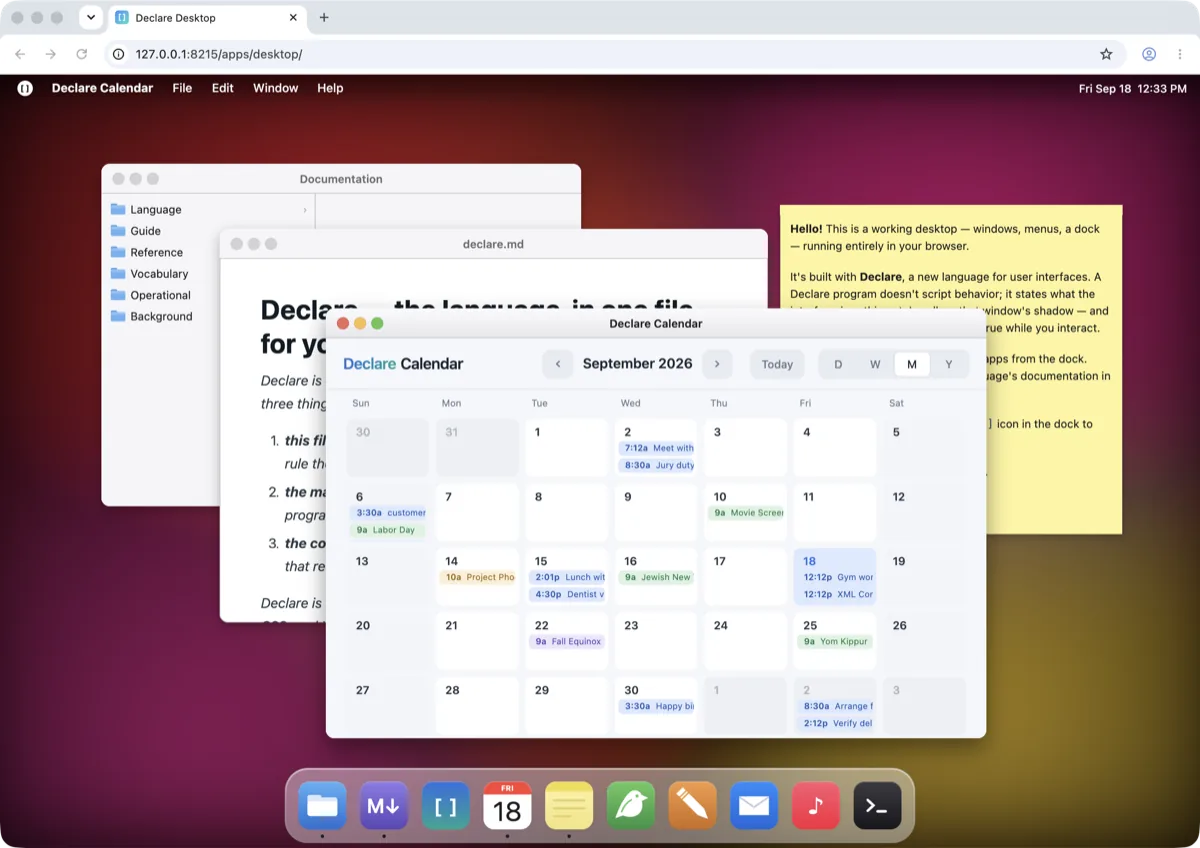
Browser · DOM
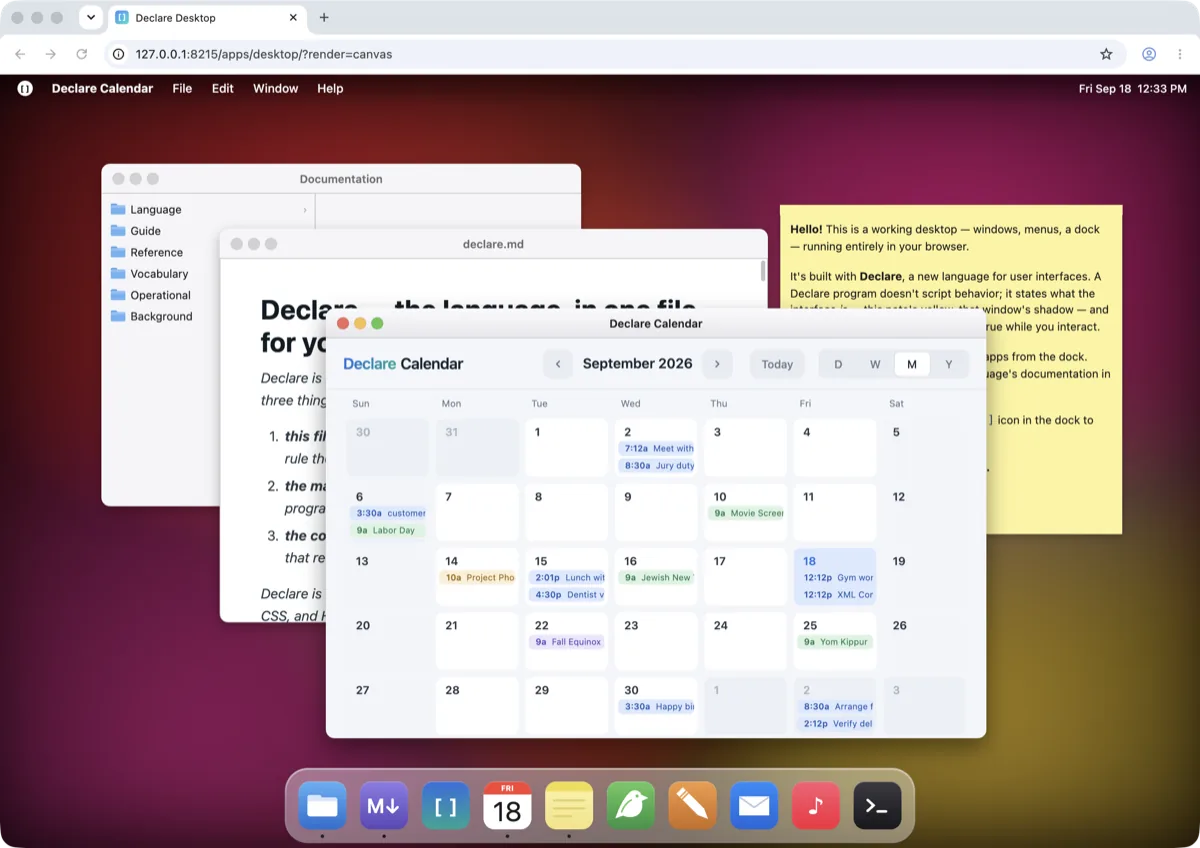
Browser · drawn to pixels (?render=canvas)
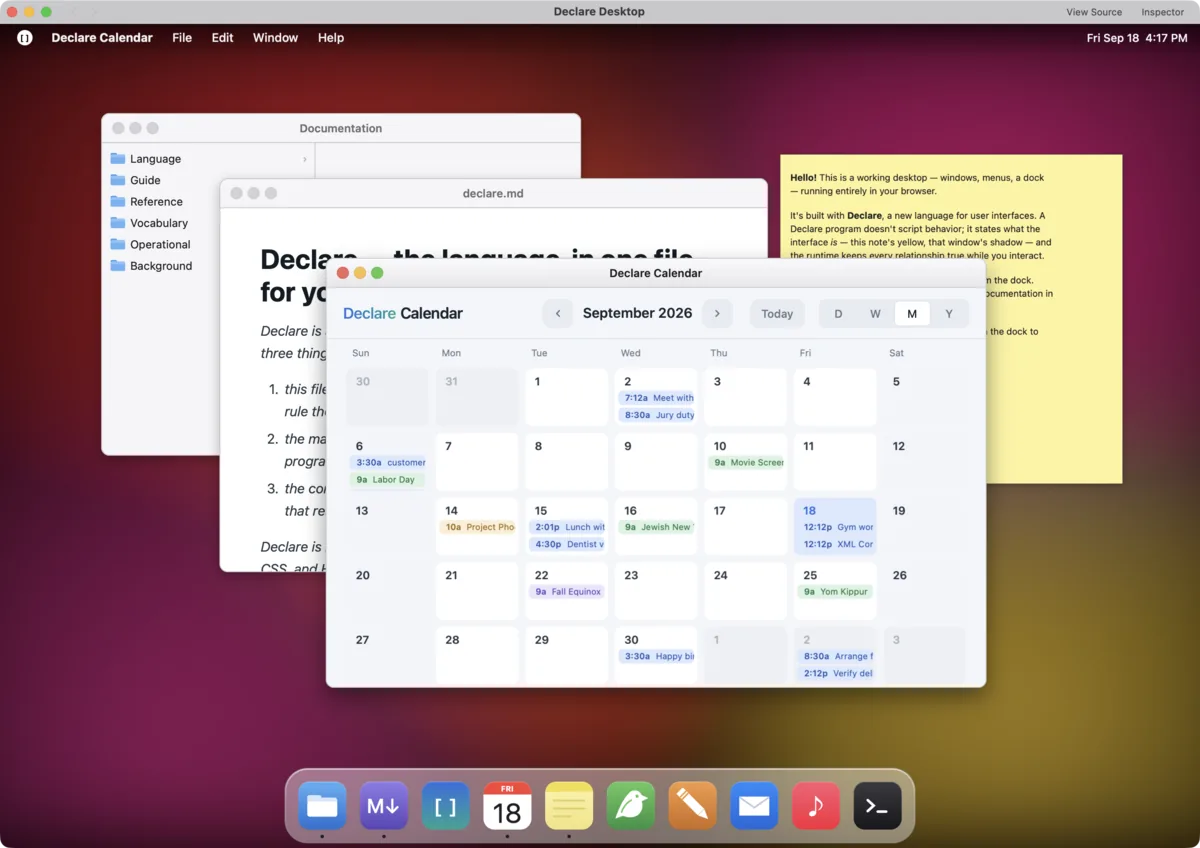
Mac host · no browser in the process
Drawing crosses the interface the same way. A view that needs a mark attributes can’t express — a gauge, a sparkline, an icon — defines draw(d). It looks like canvas code but it records; the recording is plain data that the DOM backend rasterizes into the view’s own element, the canvas backend replays during its composite, and the Mac replays through Core Graphics. A drawing that read nothing that changed costs nothing.
Declare’s own model is single-threaded by construction: a settle is one step, and there is nothing in the language that runs concurrently with it. That is what lets hosts thread freely on their side of Surface — the canvas backend rasterizes drawings in a worker, and the Mac runs the runtime on a thread of its own and commits to the display on another. Your program never sees any of it.
06
Interoperability
Surface is the boundary between the runtime and its host. There is a second boundary, between a Declare program and code that isn’t Declare, and it has the same shape in every direction. A page embeds a Declare app by marking a sized element as its host — one attribute, data-declare-embed — and the app runs in that box like any other element on the page. The interface between them is declared, not improvised: the page provides values the app reads with hostProvided, the app exposes values the page reads back, and messages go both ways: the app sends with postToHost and hears onHostMessage, the host sends with post and hears onPost. Inside a Declare program the same contract runs the other way. A DOMIsland is a box the tree sizes and positions, inside which a video player, an editor or a React widget owns its own DOM. An AppIsland hosts a second Declare program as a tenant with the same provides, exposes and post — this article is one, mounted inside the homepage, taking its theme and type from the page around it. Three directions, one boundary, one vocabulary.
07
What remains the browser’s
A Declare app in a browser is a web page, not an imitation of one. The behaviors that make a page a page stay the browser’s, and Declare does not simulate them: text is real text — it selects, it finds, it copies; fields are native fields, with native carets and input methods; scroll and overscroll are the page’s own; links are links, ⌘-click and all, and the Back button tells the truth; a crawler reads a static extraction from a plain host. The DOM renderer is the default because nothing about the program’s meaning is at stake in the browser, so all of that can be left to the browser without risk. A reader would struggle to tell a Declare page from any other.
What keeps that description honest is the second rendering. A program that owns its own semantics — no stylesheet, no browser layout engine to defer to — can be checked against another realization of itself, and the platform’s test suite holds the DOM renderer and the pixel renderer to the same picture on every change. The discipline that makes a front end complete is the same one that makes it mean exactly one thing.
Reopen this page on the canvas renderer →
Read this page’s source →
This page is a Declare program; every figure on it is made of views. Sizes were measured on 18 September 2026 from declarec production builds, gzipped at the default level.
Declare
Try it now
Why Declare
FAQ
Architecture
Apps
Docs
GitHub